Author Archives: TM TKO

Clearance Example – COCAINE & RHINESTONES

It’s been a while since we’ve taken a look at a clearance search. I have been listening to the podcast COCAINE & RHINESTONES by Tyler Mahan Coe, so let’s take a look at that mark.

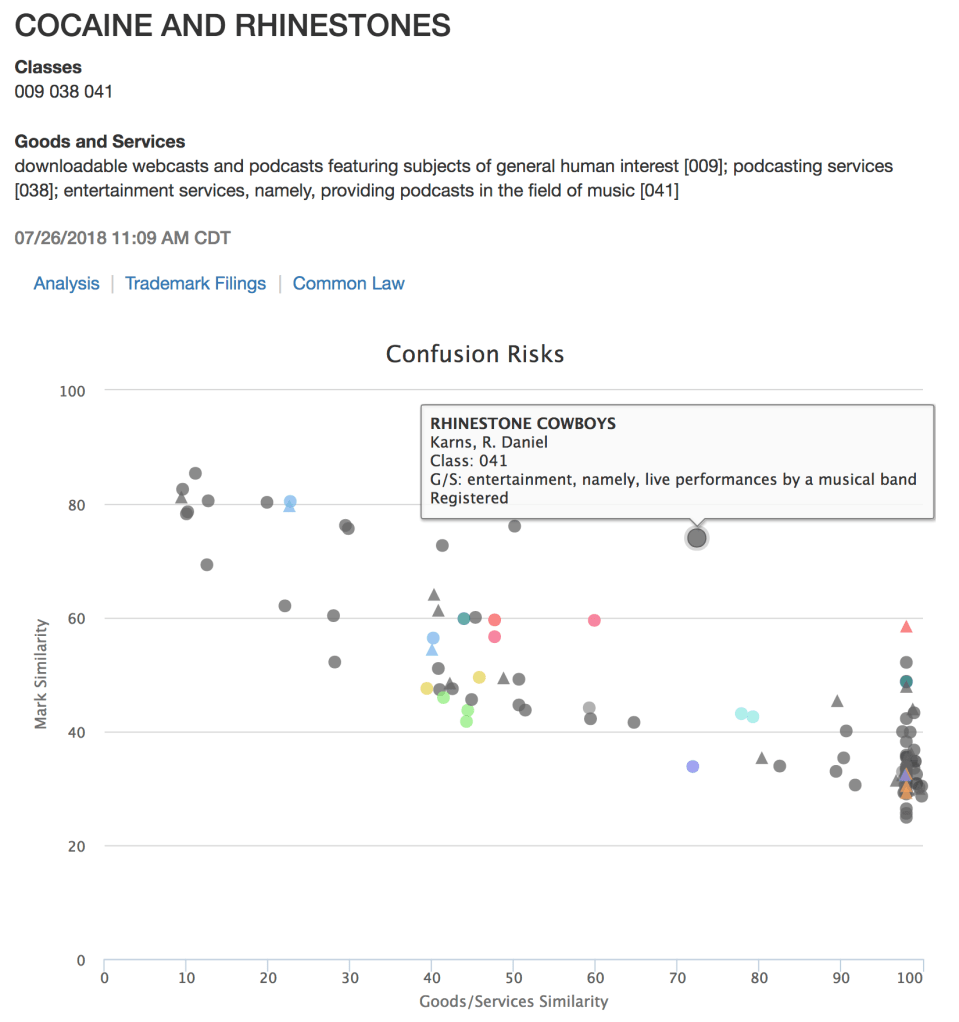
To do the search, we just enter the mark and several goods and services related to podcasting – downloadable podcasts in Class 9, podcasting services generally in Class 38, and music podcasts in Class 41.
cokestones

We can see at a glance that we have several marks that include varieties of RHINESTONE in relevant classes and for related services, plus a few (the slightly lower line) that include the slightly more common COCAINE, but nothing with both (those would be right at the top of the graph). Double-clicking on any result takes you down to full details, like the following. In the full table, you can tag results for easy export to Word, or export TSDR status and title copies if you’re doing a search to find evidence for use in prosecution.

cokestones_4

How about identifying common-law use? Unsurprisingly, both the result sets for the mark alone and the mark plus podcast-related services zoom in on the podcast immediately.


cokestones_2

cokestones_3

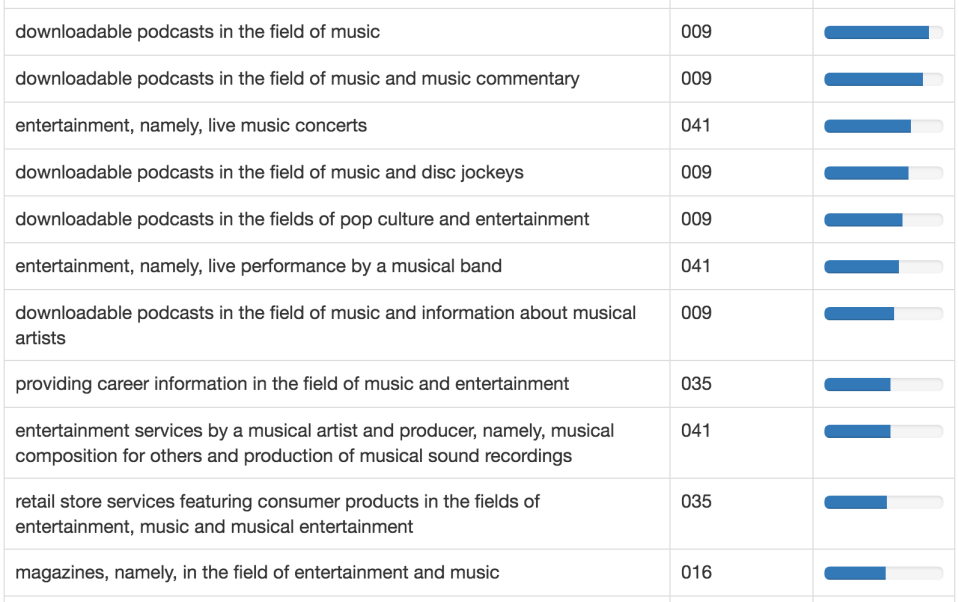
Just for fun, let’s say you were planning on filing an application and wanted to get some ideas on other services that might be related. Let’s use the “Related GS” tool under the “Tools” menu to look for other descriptions that frequently overlap in active, use-based registration that contain “entertainment services, namely, providing podcasts in the field of music” in Class 41. We see a wide range of results, from downloadable podcasts in Class 9 to live music in Class 41 to career information in the music field in Class 35 and music magazines in Class 16. All could certainly be viable expansion avenues for a successful podcast.
cokestones_5

Happy searching!
Updates to 2(d) Citation Office Action Research

TM TKO has updated our Office Action research tools! You can now separately search criteria for both the trademark application that got an Office Action and for the criteria of the application that was cited by the Office as a possible bar to registration. This permits even more simple, in-depth research for specific refusal fact patterns.

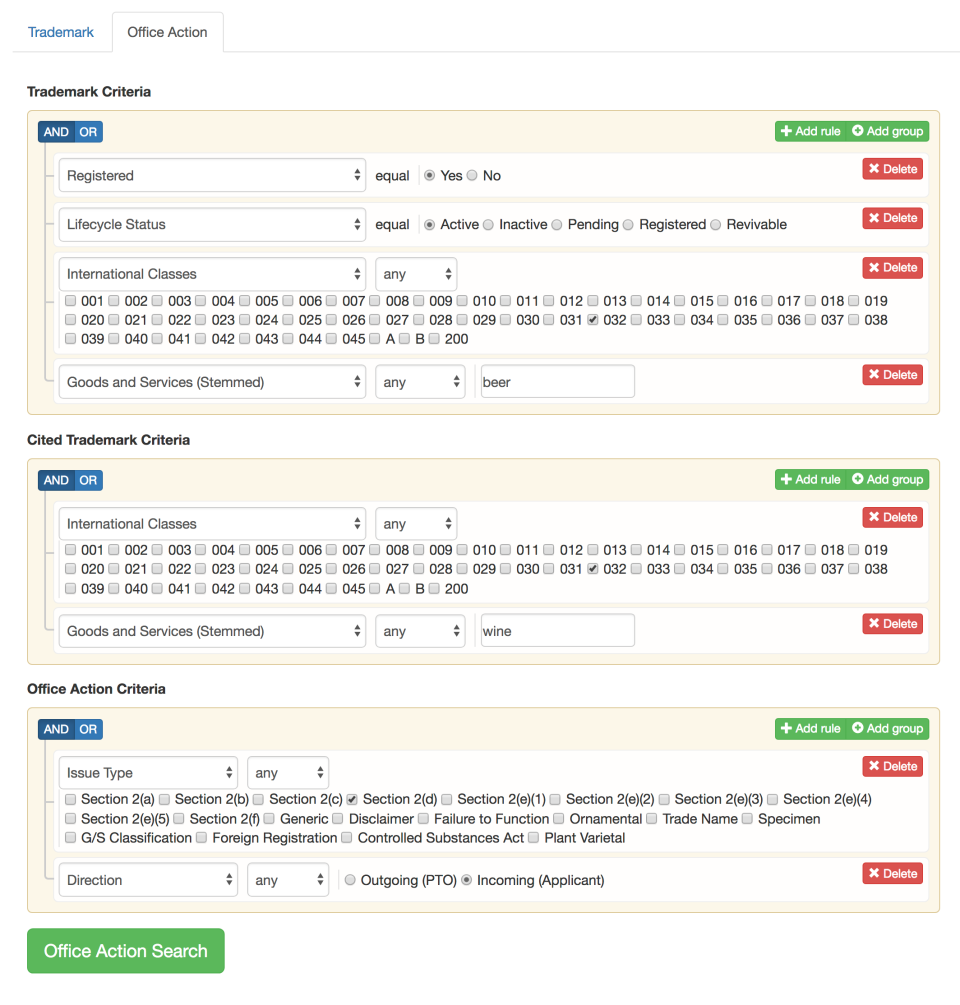
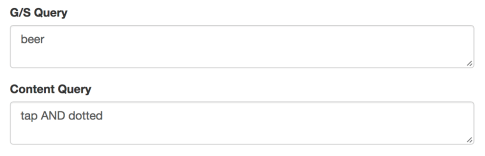
For a sample, the search below identifies the relatively small number of applications for beer that faced a 2(d) refusal but ultimately made it through to registration. This search focuses on incoming responses that successfully overcame the refusal. This is a longtime bugaboo for prosecution attorneys, who see less overlap in the marketplace than the USPTO precedent recognizes.

Cited_example

The search yields more than eighty examples of applicants who got these sort of 2(d) refusals and ultimately moved to registration, whether due to argument alone, consent agreements, or otherwise. You can then use these as resources to find useful arguments, use select outcomes as examples, and more.

2d Updates results

Happy searching!
Flag Down Successful 2(b) Refusal Responses

Happy 4th of July week!

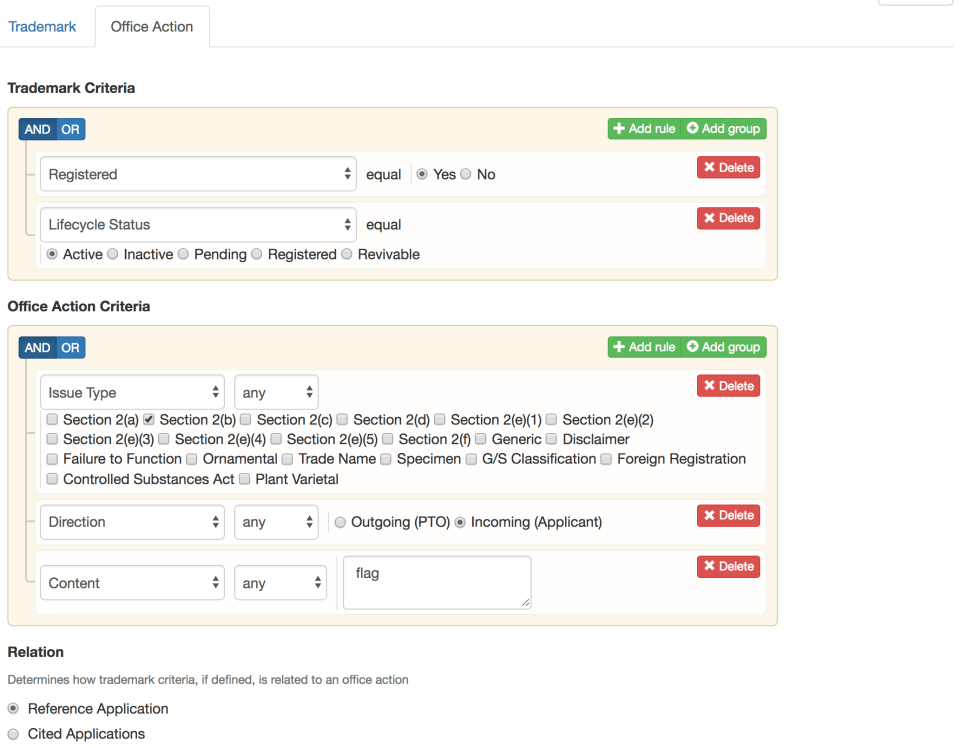
We’ll stick to the patriotic theme with an explainer on how to find other applicants who have overcome flag-related refusals. Here is the search strategy to focus on applications that have received relatively-uncommon 2(b) refusals, overcome them, and are still on the registry. The “content” field is free-text; it lets us focus on flag refusals rather than insignia:

flag_search

We can quickly identify more than 150 active third party registrations. Let’s say that our refusal includes a design element for the US flag – let’s limit our search just to American flag refusals that resulted in registrations since 2016.

flag_search_usa

We quickly identify a number of directly on-point registrations, including the following: flag_logo_2 Office Action Response link, Ser. No. 86825429, and flag_logo_1 Office Action link, Ser. No. 87315742. These provide a great start. You can further refine the search by focusing on additional “Content” terms that match your situation, e.g. to focus on designs where the flag is at an angle, or a background feature, or etc. Using TM TKO’s Office Action response research tools, you can supplement your TMEP and case-law driven arguments with directly on-point factual comparisons and reasoned decisions from Examining Attorneys.

Updates to ThorCheck Reporting

We have made a couple of updates to ThorCheck to enhance its utility. While ThorCheck has always been limited to active, use-based registrations, the reports previously did not include current status or registration dates. Each of these details has been added to the “Mark” column. The new reports are a bit longer, but have more information that will be useful to a reader who may not have all the background that you the user possess.

Thor_June_18_blog

As has been the case since last summer, you can immediately export current status and title copies of any tagged records from TSDR via the very creatively-named “TSDR” button in the upper right. If you are submitting evidence to an Examining Attorney or in a TTAB proceeding, this is crucial to make the registration pairs identified via ThorCheck officially “of record” and provide maximum punch.

Setting up a 2(d) Citation Watch

All TM TKO subscriptions include unlimited watching, and that includes our brand-new 2(d) citation watching tools. Read below to learn why and how to set up 2(d) citation watches. (This post was updated on July 13, 2018 to reflect improvements to the watch setup interface.)

Why use 2(d) Citation Watching?

First, you can do the best possible job protecting your clients. You’ll get a notice when a USPTO Examiner cites one of your client’s applications or registrations against a third party application. This is a key action point, where your client can send a demand letter to “pile on” to the USPTO’s refusal, and often push the applicant for a confusingly similar mark to either drop the application or drop the mark entirely.

Second, you can develop more business from the best customers in the world – your existing clients. Where a client may be cautious about investing attorney time or money to watch for confusingly similar marks in a speculative manner, clients tend to be much more willing to take action on a concrete issue that the USPTO has already identified as likely to cause confusion.

How do you set up 2(d) Citation Watching?

It’s simple! Go to “Watch,” then “New Watch” then “Office Action.” Give your watch a name, and pick a frequency – weekly is probably best to ensure that you can act before the applicant files a response.

The screenshot below shows how you would set up a watch. Under “Office Action Criteria,” pick a “Direction” and select “Outgoing” (to see Office Actions only and not responses), then “Add rule” and add an “Issue Type” with “Section 2(d)” to see citations only.

Then, under “Cited Trademark Criteria,” use “Correspondent Email” or “Attorney of Record” to identify just your clients, or “Correspondent Firm” to see your full firm. If you use “Attorney of Record” and don’t have an extremely uncommon last name, you probably want to select “all” in the drop-down to make sure you only identify your own portfolio.

2d_Cite_Watch_update

Finally, if you want to generate a CSV file of the items in the report, just click the option and you’ll get it via email. You can use this data to, for example, automatically generate reporting smart, issue-driven reporting emails to clients.

Get watching! As always, if you have any questions or need setup help, please email us at support@tmtko.com and we would be happy to help.
 

TM TKO releases free-text and issue-based Office Action Research Tools!

TM TKO is excited to announce the launch of its Office Action research and watching tools: free-text and issue-based searching in more than ten million Office Actions and Office Action Responses.
What can you do with Office Action research? Quickly and easily see how other applicants successfully navigate issues that you aren’t as familiar with, find model responses, find the types of arguments that your Examining Attorney tends to like, identify reasoned decisions that are far closer to your facts than the available TTAB decisions, see how other attorneys are citing to a particular case, see the types of evidence others submit in response to a type of refusal that you are facing, and much, much more.
To access these tools, go to the “Search” menu. You will see two tabs, “Trademark” and “Office Action.” “Trademark” provides the usual list of application details, while “Office Action” will provide direct links to Office Action documents. In either type of search, you can construct complex Boolean searches from over sixty “Trademark Criteria” fields and add Office Action-related search criteria like free-text search, issue, and document type, allowing you to drill into prosecution histories in a way that was never possible before.
You can also quickly and easily set up a 2(d) citation watch to see when your clients’ marks are cited as bars to third-party applications – key points where you can inform your client and possibly apply extra pressure on the applicant, like a demand letter. To set it up, go to “Watch,” then “New,” then “Office Action.” You can put your information in either the “Correspondent Email” or “Attorney of Record” fields in “Trademark Criteria,” select “Issue Type” and “Section 2(d)” in “Office Action” criteria, select the “Cited Applications” radio button, and you’ll be off and running!
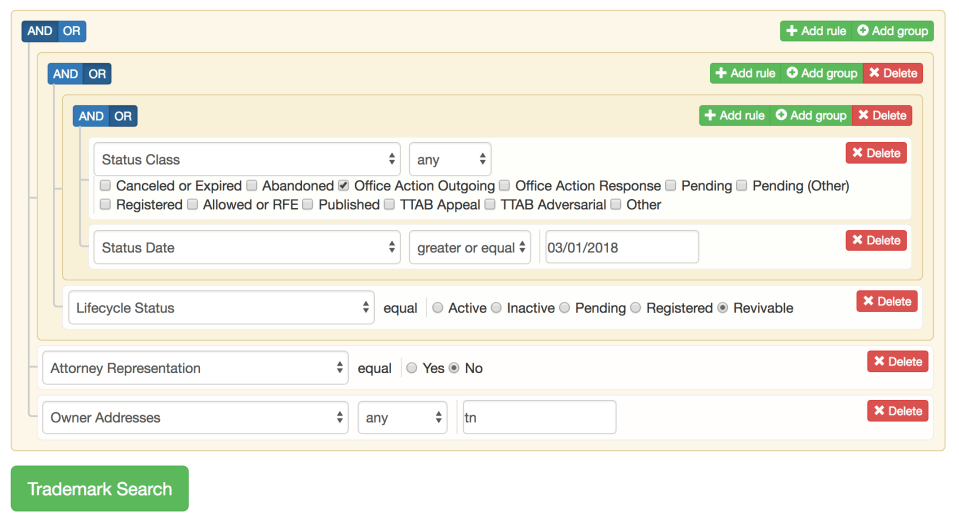
Office Action watching can also really help with business development. Finding applicants who face Office Actions without attorney representation is simple: set up a new Office Action watch, select “No” from “Attorney Representation” in the “Trademark Criteria” section, pick any kinds of issues you want reported (or all of them) from the “Issue Type” selector in “Office Action” criteria, and select the “Reference Application” radio button, and you will see new outbound Office Actions to unrepresented parties. You can focus on key markets by adding extra criteria, like the geographic location of the applicant in the “Owner Addresses” field or by targeting Madrid Protocol applicants by limiting to the 66(a) in the “Current Filing Basis” field, both in “Trademark Criteria.”
If you are at the INTA Annual Meeting, please drop by the booth for a quick demonstration, and bring a friend! We’re in Booth 255, all the way on the right towards the front.

TM TKO Releases Manual Search Tools!

TM TKO has released manual search tools. The tool supplements our existing automated knockout tools and to allow you to do complex, targeted research.

Accessing Manual Search

To access manual search tools, log and then click “Search” in the toolbar.

TM TKO’s manual search combines structured field-based searching with flexible, Boolean logic that visually displays nested conditions, making even complicated search strategies simple to follow.

Use Cases for Manual Search

Due Diligence

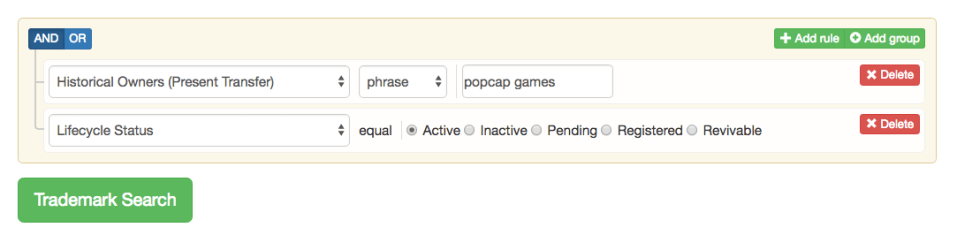
Search by owner, including current owners and prior owners. You can even do separate searches for prior owners that had immediate rights in the mark or those that were “owners” only of a non-present interest, like a security interest or option.

This search identifies active registrations and applications held by a single party:

manual_3

And this identifies registrations that a company used to own:

manual_4

Quick Status Checks

TM TKO lets you quickly check on the status of one of your client’s applications or a third-party mark, and take advantage of our reporting tools if you need to save results in a way that you can’t do conveniently using TESS.

Search by Status

Identify applications by their most recent status – outgoing Office Action, inbound Office Action Response, Published, Allowed (or extended), a TTAB status, and more.

Clearance or Analysis

Want to use your own search strategies? No problem! You can still take advantage of complex mark search strategies that our automated clearance search relies on. For instance, “Mark Basic” builds in a variety of search strategies like searching for the exact mark, the mark as a term in other marks, stemmed versions of the mark, pseudo mark, and translation, and phonetically similar marks otherwise that appear to be strong matches.

You can also search by mark “features,” like the presence of a numerical or temporal component, currency, domain name extension, emoticons, and more.

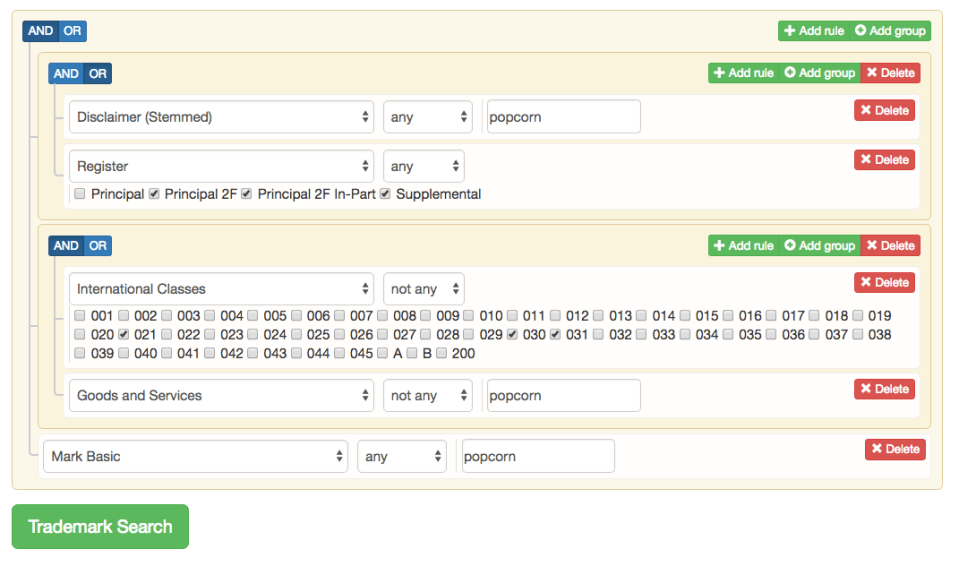
This sample search identifies instances where a filing includes POPCORN and either disclaims the term, has a 2(f) claim, or has a Supplemental Register registration and doesn’t include any of Classes 21 (popcorn machines) or 30 (popcorn) or 31 (unpopped popcorn), or “popcorn” in the description of goods and services. You could use this research to, for example, assess whether a disclaimer would be appropriate.

manual_1

Business development

It’s simple to zoom in on unrepresented applicants facing issues like an Office Action or a recently abandoned application, or to limit your search to a geographic area for a more personal touch.

The following search will identify either recently-abandoned applications or newly issued Office Actions for unrepresented parties, and focus just on applicants located in Tennessee. This identifies a significant number of local, unrepresented applicants with problems that a trademark attorney could help with.

manual_2


Start Using TM TKO

Not currently using TM TKO? Subscriptions with unlimited use of all of our searching and watching tools start at $250 per month for one seat. If you have more limited needs or have to have pass-through transactional billing, you can sign up for an unlimited-use daily pass for $75.

Sign up for a free one-month demo here, or contact us with any questions at inquiries@tmtko.com or 206-679-1895.

ThorCheck updates!

We have just released two improvements to ThorCheck™ that we’re very excited about.

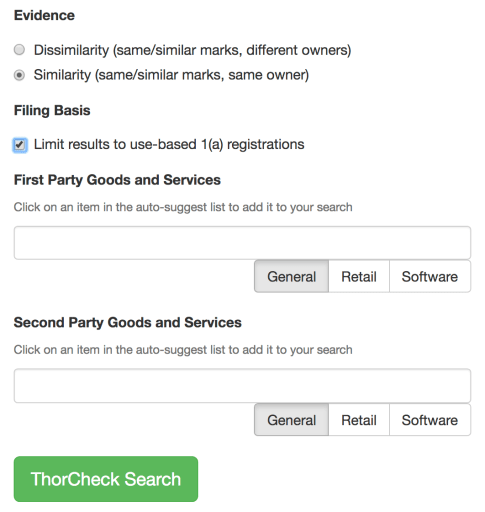
Similarity searching. You can now use ThorCheck to find evidence that goods or services are related, by finding instances where the same mark is used for both sets of goods or services with the same owner. ThorCheck identifies relevant evidence whether it was in a single registration or in multiple registrations. Since many companies split coverage for a mark in multiple classes into multiple registrations, ThorCheck can save hours of work.

To do a similarity search, just select the option below:

ThorCheck_options.png

Filing basis options. You also now have an option to either limit your results to Section 1(a) use-based registrations only or to also include non-use-based registrations under Sections 44(e) and 66(a). The former remains the default, as there is TTAB precedent that this evidence is more persuasive, but Section 44(e) and 66(a) registrations paired with evidence of actual use in US commerce can still be useful.

Example search – pizza and sausage. Of course pizza and sausage are related goods, you say, whilst munching on a supreme pizza. If you want to document their relationship more formally in an opposition proceeding, and an Instagram post of your preferred pizza toppings won’t quite be enough, a quick ThorCheck similarity report identifies highly persuasive, registry-based evidence that the goods are related. A screenshot showing the first couple of results is below.

ThorCheck_pizza_sausage.png

We hope you enjoy the new options!

New Tools: TSDR Status and Title Export

You do trademark searches for lots of reasons – to clear a mark, to pull together a field of relevant marks to make a dilution argument, to pull together evidence for a TTAB proceeding or litigation, and to do transactional diligence.

If you want to refer to a US federal trademark registration in an Office Action response or in a TTAB proceeding, for example, to make the argument that a common term in your client’s mark and a prior registration is weak or diluted, see Jack Wolfskin Ausrustung Fur Draussen GmbH & Co. KGAA v. New Millennium Sports, S.L.U., 797 F.3d 1363, 116 USPQ2d 1129 (Fed. Cir. 2015), you cannot simply refer to the mark’s registration number, provide full details, or even provide a search result from a commercial vendor, see In re Hub Distrib., Inc., 218 USPQ 284, 285 (TTAB 1983): the Office or the Board will take no account of this information, even though they can quickly and easily verify the details using their own computer systems. Instead, the attorney must submit a “status and title” copy to make the third-party registration “of record” in the prosecution file or dispute proceeding. See In re Mucky Duck Mustard Co., 6 USPQ2d 1467, 1470 n.6 (TTAB), aff’d per curiam, 864 F.2d 149 (Fed. Cir. 1988). Making registrations of record used to require a certified copy from the Office, which could take time to deliver and was (and remains) expensive, but now a TSDR status page for each record suffices. See TBMP § 1208.02.

If you are submitting a lot of evidence of third party registrations, this can still a time-consuming and unpleasant project. TM TKO now provide two super-fast, easy ways to export status and title copies.

To export from a search report or from a ThorCheck report, first, make sure that you have tagged the relevant records. Second, in the upper right of your report, you’ll see a “TSDR” export option.

TSDRexport1

Click the “TSDR” button and then click “Export.”

TSDRexport2

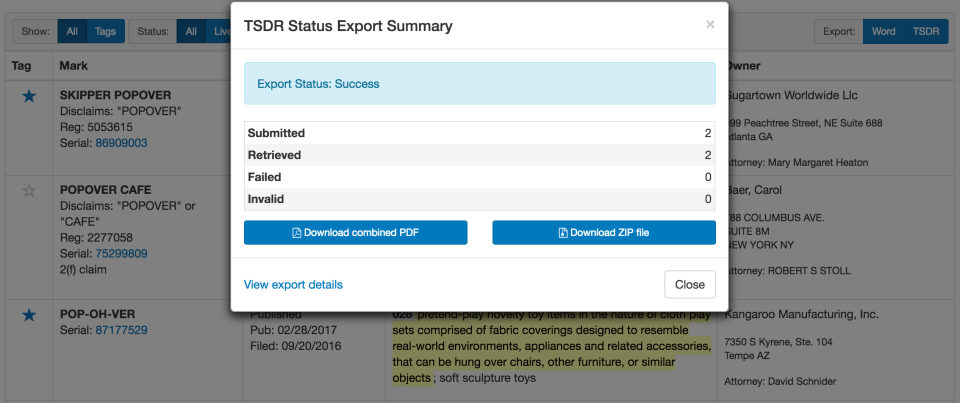
You will get a report summarizing the documents that were downloaded and letting you know about any errors, and have the option to download either a single combined PDF file or a ZIP file with each individual record in a separate file.

TSDRexport3

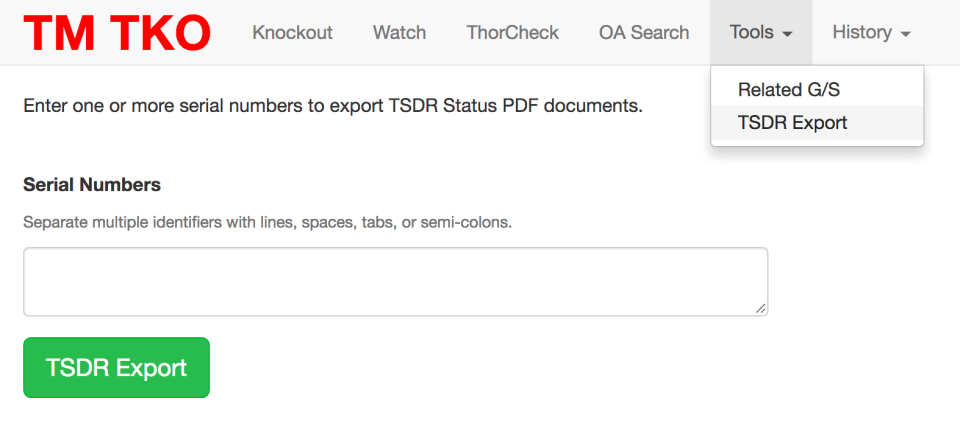
You can also export TSDR records directly from a standalone tool, available in the tool menu.

TSDRexportStandalone

We hope these new tools will help save you time and effort and provide better results to your clients!

New features! Tag, filter, sort, Word export, and more.

Over the past few weeks, TM TKO has rolled out a number of improvements, but we haven’t done a formal blog post about them yet!

Search, Watch, and ThorCheck

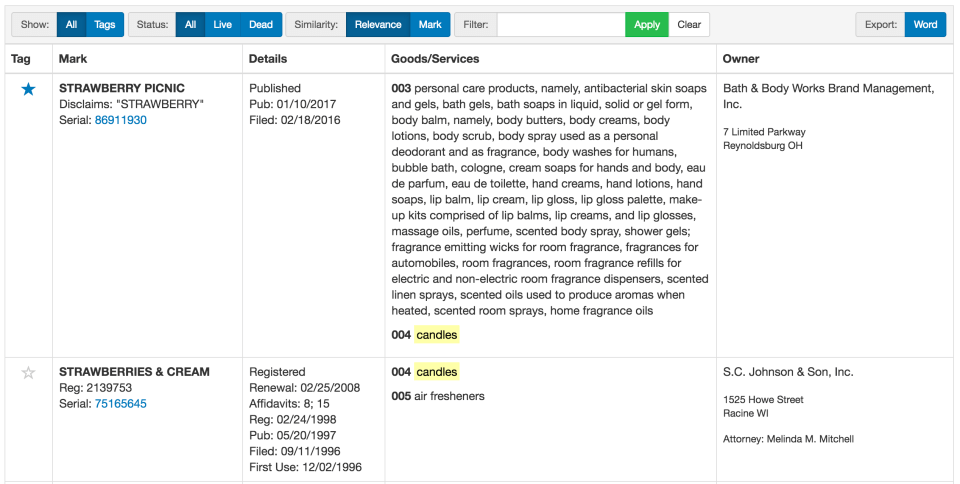
You can now interact with the mark result tables in search, watch, and ThorCheck report results with a full range of interactive tools:

  • tag key results;
  • filter by tagging status or live/dead status;
  • sort results by overall relevance (mark similarity + goods/services similarity) or just mark similarity (i.e. sort by the y-axis on the scatterplot);
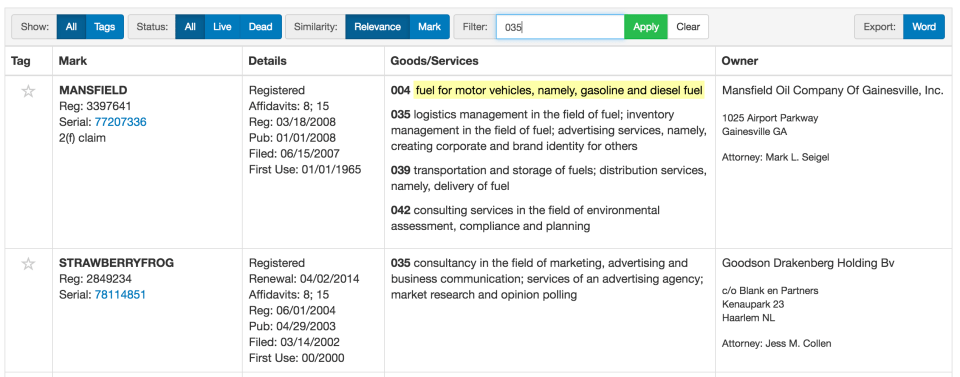
  • filter using free-text search (to filter by class, goods, owner, etc.);
  • export to Word.

These features live in a toolbar at the top of your federal search results (in search and watch) or at the top of your ThorCheck report.

Table1

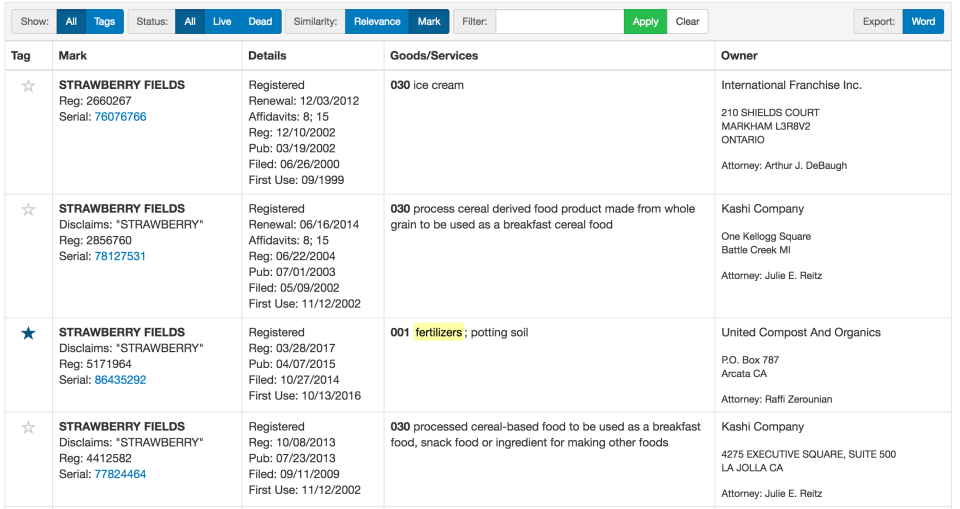
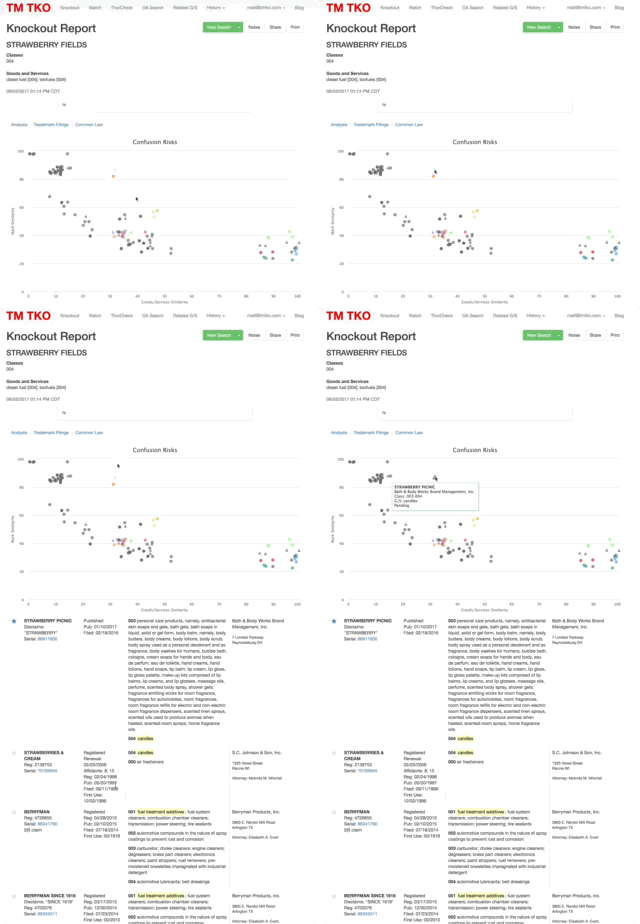
The image below shows the “Mark” similarity sort applied, bringing more-similar marks (albeit for much less related goods) to the forefront. Applying this sort is a quickest way to review searches where your look at the scatterplot suggests that the most concerning marks are out-of-class.

Table2

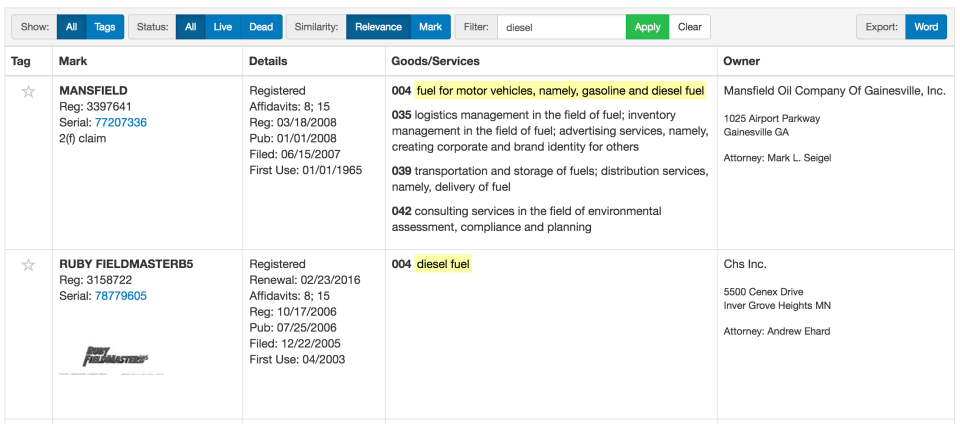
Free-text filtering opens up lots of possibilities, including filtering by goods:

goods

Filtering by class:

class

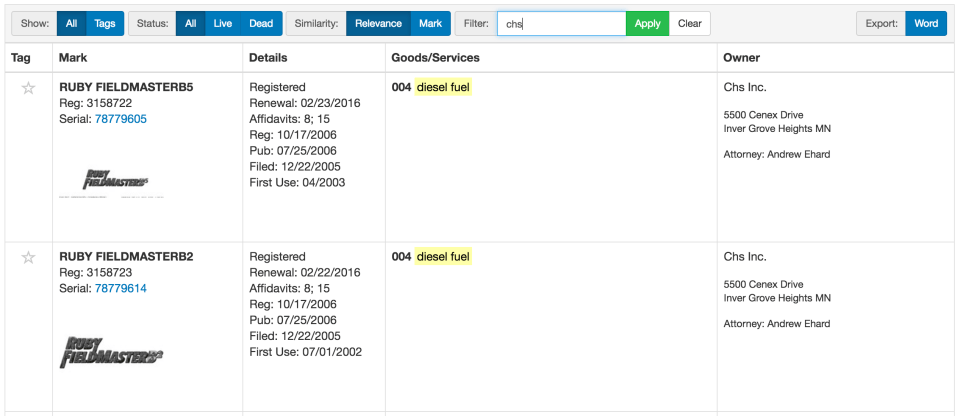
And filtering by owner:

owner

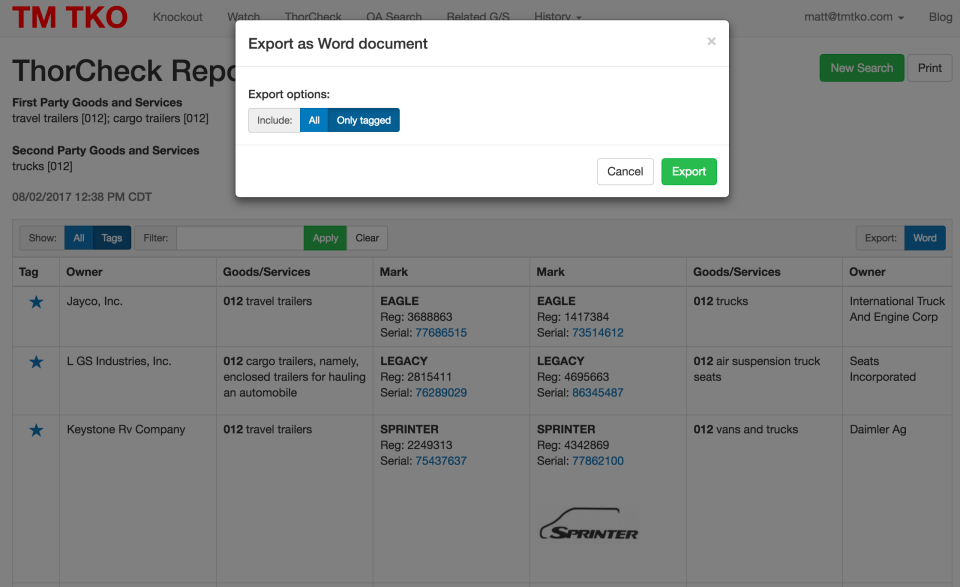
Export to Word lets you export your table of results (either the whole table or just tagged items) for further word processing, making it easy to incorporate results into an Office Action Response or just to match your preferred firm or practice group formatting.

Export

Search – Double-click to jump

Double-click on any point in the scatterplot to jump immediately to the full record in the table. Interacting with TM TKO’s unique graphical search analysis is now easier than ever.

Double click small

Search and Watch – Setup

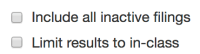
We’ve added a checkbox to let you limit results to just the class(es) of the goods or services you entered. This helps where you are searching a very diluted term, or if the client only is willing to enforce in the class(es) where they own a registration.

In-class

What’s Next?

We hope you love all the new interactive features!

We are working on a solution that will generate TSDR status and title copies for you. It should be available both as a standalone tool and as an export option from search, watch, ThorCheck reports. It will be a great convenience when generating large amounts of evidence for an Office Action Response, Letter of Protest, or an adversarial proceeding at the TTAB or in federal court.

Keep your eyes out for updates here and on Twitter!

Tapping the Power of Office Action Search

The vast majority of “law” created in the trademark space is made via ex parte examination by the US Patent & Trademark Office. There have been over nine million Office Actions and Responses sent to and from the USPTO and trademark professionals, compared to only some 850 citable and 11,600 non-citable decisions from the Trademark Trial and Appeal Board, and a similarly small number of federal and state cases.

This June, TM TKO is revealing tools that will let you tap this huge body of Office Actions and responses. This series of blog posts will explore situations where the power of Office Action search can help you be a better lawyer.

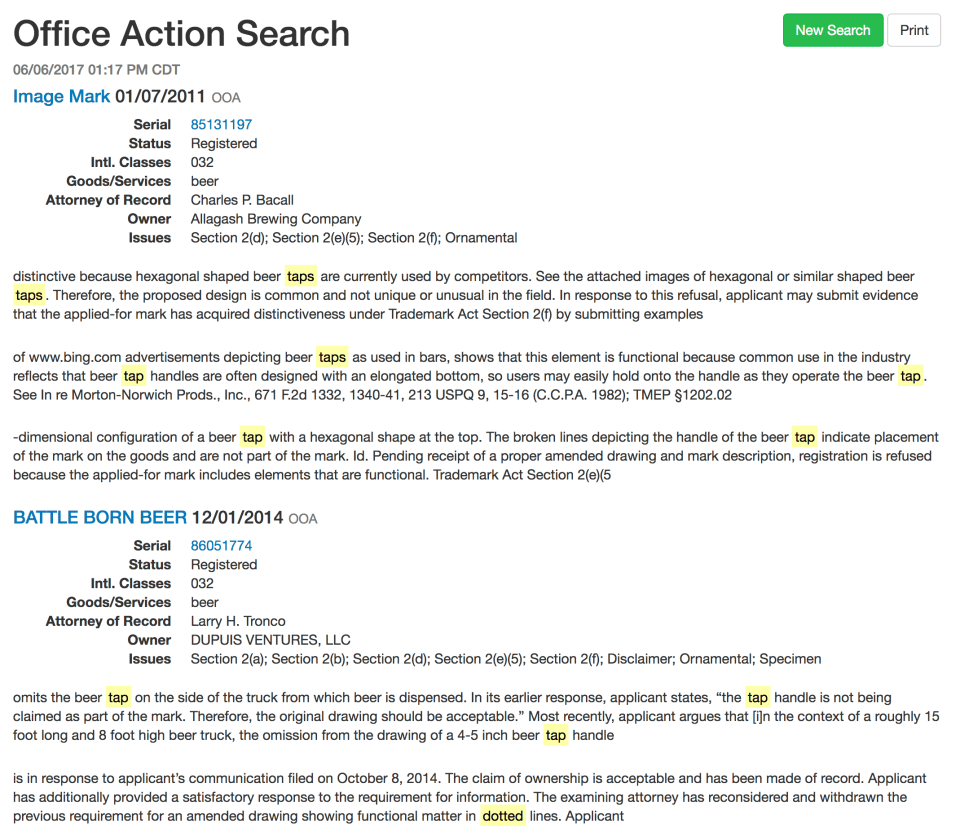
Let’s consider a situation where your client, a craft brewery, has applied for the shape of a tap handle that it plans to use in bars. The design consists of a five-pointed star. The Examining Attorney has refused the mark as ornamental. How do you move forward?

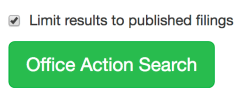
Currently, you’re limited to poking around on TSDR in the hopes that you run across an application that raised a similar issue. With TM TKO, you can skip all the guesswork and focus right in on the most relevant prior Office Actions, and identify model responses. You can even limit the results to applications that eventually moved on to publication, indicating that they overcame the issues raised by the Examining Attorney.

OAbeertap
OAIssue1
OAPubOnly1
Here’s what we see – a set of results focused on exactly the sort of issue your client faces.

OAResults1

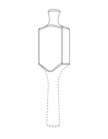
The first result is the prosecution history for the following tap design:

Tap1

In an Office Action issued in 2011, the USPTO preliminarily refused registration on the grounds that hexagonal designs were common or basic in the industry, and thus likely to be perceived as ornamental or otherwise non-distinctive. Counsel for the applicant, Charles Bacall of Verrill Dana, LLP, submitted a lengthy response arguing both that the design is inherently distinctive, differentiating it from the evidence provided by the Examining Attorney, and arguing in the alternative that the mark has acquired distinctiveness based on considerable sales figures and supporting affidavits from industry experts. It’s a perfect model to start thinking about and planning a response to your client’s Office Action. Despite the excellent arguments, the Examining Attorney would not yield, and the mark was registered on the Supplemental Register – also a useful data point in advising your client about the chances of success and the best path forward. A 2(f) claim was accepted in a subsequent filing for the same mark, and the mark is now protected on the Principal Register, Reg. No. 4,872,679.

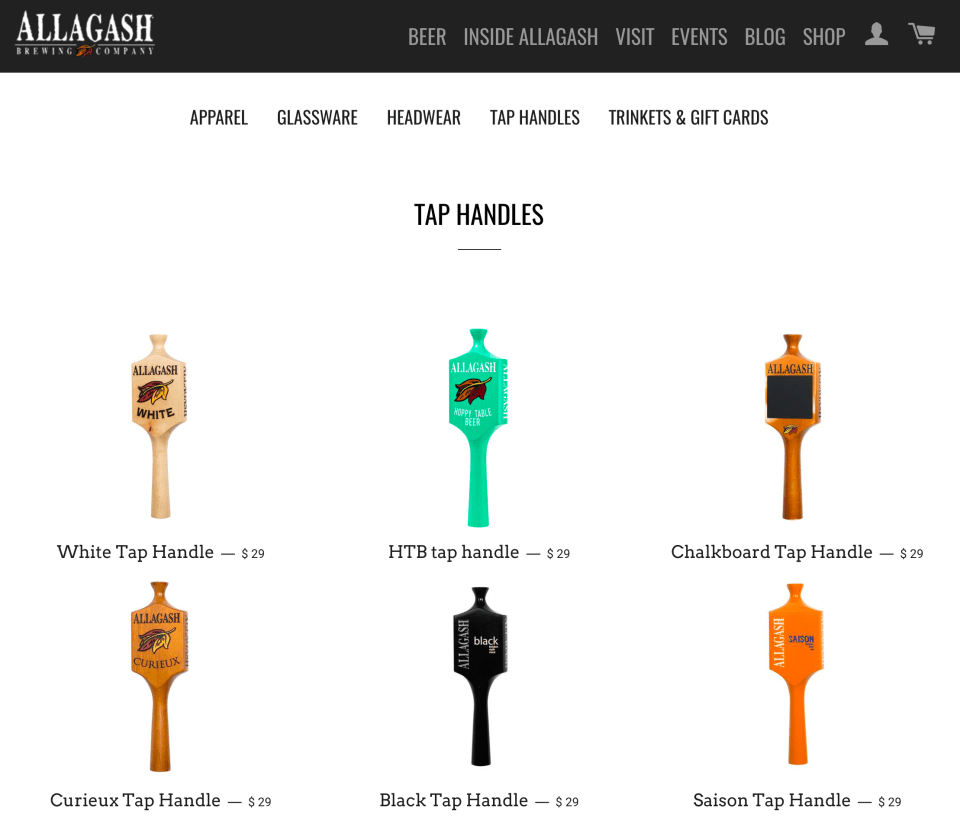
Today, not only does the tap handle design a registered trademark that helps drinkers identify Allagash Brewing Company beers from across a bar, the company even sells tap handles from its online company store. You can buy one for your home pub at https://shop.allagash.com/collections/tap-handles.

TapHandles

Over the coming days, we will continue to explore more situations where Office Action and Office Action Response searches can help you do your best work for your trademark clients.

Pharma? Class 5 filings in 1Q 2017

International Class 5, which includes pharmaceuticals, is one of the most active classes for trademark applications at the USPTO. This blog post looks at some interesting Class 5 filing trends (and interesting marks) for applications filed in the first quarter of 2017.

The Most Common Class 5 Products

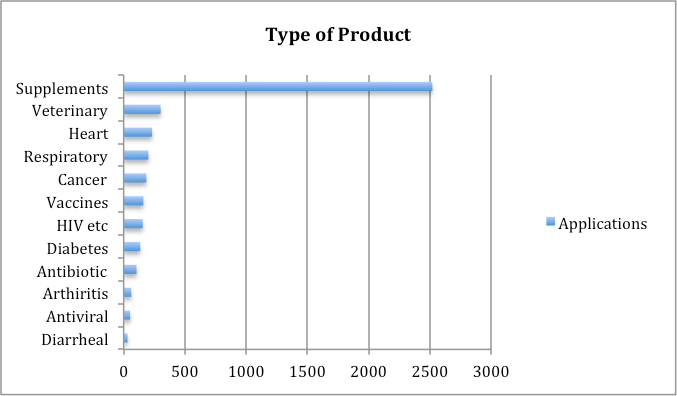
What types of products are applicants filing for? Most applications appear to be for easy-to-produce, lightly-regulated products like supplements and vitamins. It makes sense that there would be more of these than development-intensive, highly regulated pharmaceuticals, but the degree to which applications for these goods predominated was surprising.

Pharma_goods_spring_2017

How are Applicants Filing?

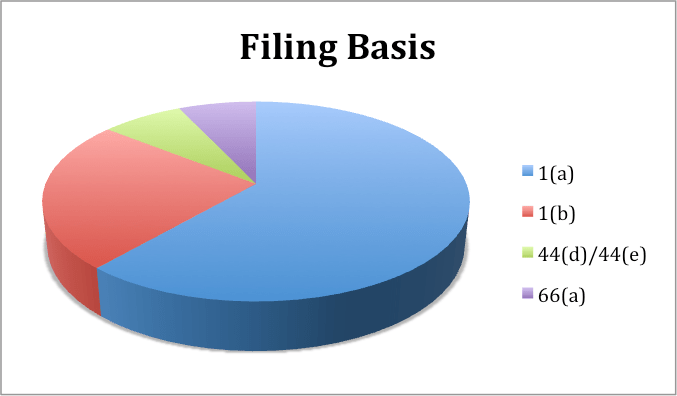
Most applications are filed based on actual use, followed by intent-to-use claims. Foreign priority or registration claims and Madrid Protocol applications lagged well behind.

Pharma_basis_spring_2017

Where are Applicants Located?

Together, applications from twenty of the largest foreign filers of Class 5 applications amounted to only about 800 applications, or about 16% of all 2017 applications in Class 5. Canada and Switzerland led the way, with China, Japan, Germany, and the UK well ahead of the rest of the pack.

Pharma_foreign_spring_2017

Some Fun Brand Names

Finding good pharmaceutical trademarks is tough work. There are a slew of pending applications and registrations, so clearance is tough, FDA name approval can be difficult, and marketing groups are torn between more suggestive names and completely coined marks. Here are a few of them we enjoyed.

Mark Comments
SLNDR Lose weight by removing vowels!
DANOCRINE Too remote for an effective demonstration
PUMP DIRT Checking the ingredient list…
SEXWAX !
OREGANOL

PROMATO

Combine for health-food lasagna?
DIAMOND FRESH As fresh as a billion year old chunk of carbon.
DRDOSE How is there not a rapper named this, you say? There is.
CRYPTOMUNE This will heal your animal, but if we tell you how, we’ll have to kill you.
NITRO BEETS I like this one.
GUT INSTINCT This too.
SAEF And effictive