Tag Archives: trademark

Searching “color” marks in TM TKO

“Color” marks are a bit of an oddity for trademark professionals — a color or set of colors applied to a product, packaging, or the means of providing a service that has a source-indicating function rather than a merely decorative importance.

These are difficult to search for, even using advanced AI models — like our new AI search tool! You should try it; it’s awesome!, because the mark can be displayed in several ways that look very different from each other: (1) a color swatch or swatches, (2) a drawing of an object to which the color is applied, shown in color, and (3) a drawing of an object to which the color is applied, but with stippling serving as a “code” for the color, and (4) multiple views of (2) or (3) in a single filing. Furthermore, the various angles and ways the product in (2)-(4) could be displayed could end up looking fairly different but are still representing the same mark.

One significant complication is that the USPTO and most other trademark offices deal with color marks differently, from a data perspective. Many jurisdictions around the world include a data point, which we store in the “Feature Type” field for manual searches, that identifies color marks, sound marks, holograms, smells, etc. While this data coding isn’t perfect, and often has things tagged that actually aren’t true “color” marks, it’s still pretty good and very convenient. And then there’s the UPSTO, which… doesn’t.

Instead of a single, nice, clean variable, the USPTO jams indicators that identify “color” marks into its design coding system. This is actually one of the biggest ways the USPTO design codes differ from the Vienna design code system. In the Vienna system, codes starting with 29 are just color identifiers. The mark is a pig logo that has some pink in it? Great. 29.01.01. In the USPTO, it’s a lot more complicated — the pink in the pig may only show up as a part of the color claim and/or the mark description. Instead, the color-related design codes in section 29 replicate the “color” mark boolean that is much more efficiently conveyed in other jurisdictions. The tradeoff is that the USPTO provides a little more depth, with separate categories for (a) single-color and (b) multi-color marks, (b) used on the entire items or (c) just a part of it, and for those color marks (d) used on products or items used in providing for services and (d) used on packaging or (e) other advertising, and the various combinations of these three sets of values.

So, how do you do this in TM TKO? Let’s pretend that your client is a pharmaceutical manufacturer, and has asked if they can obtain protection for a “color” mark that is a bright yellow pill (or, if not, a yellow stripe on a pill). In the US: https://www.tmtko.com/searches/2938217 for yellow just on product, or https://www.tmtko.com/searches/2938215 for any yellow on products/packaging. Internationally, it’s simpler — something like https://www.tmtko.com/searches/2938219, for a similar yellow in the EU. (And, yes, I picked yellow because it’s relatively less common.)

Happy searching!

New Image Search in TM TKO!

We are excited to announce our new, machine-learning-driven image clearance tool. Just log in and go here to try it — we’d love to hear from you about your experiences. As with all of TM TKO’s tools, access is included in any subscription or day pass.

The new system is simple. Just drop in an image; you’ll be able to crop it if needed. If you want to add US and/or Vienna design codes (particularly helpful if you have a “busy” image with a lot of visual elements, but you are most interested in one feature in particular), you can do so. Hit search, and you’ll be off.

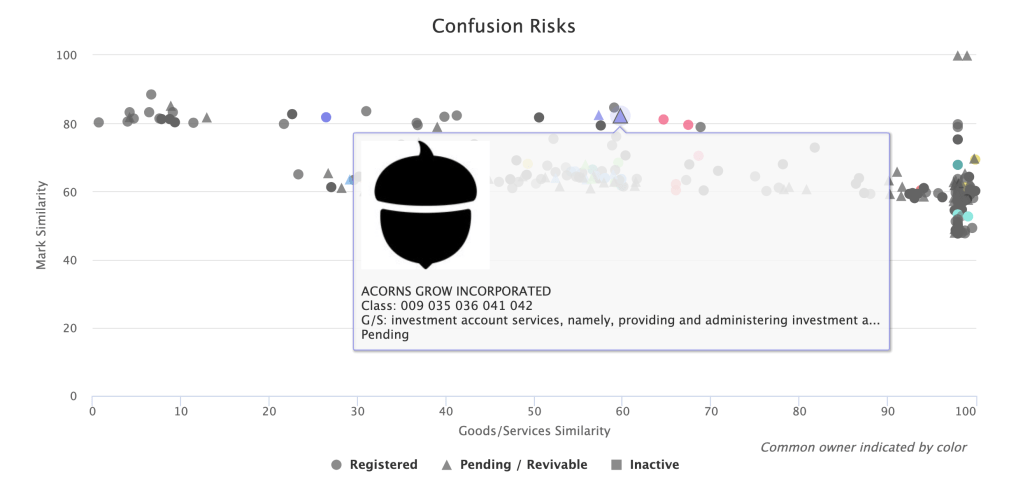
We replicated a search for a recent application for an acorn logo for insurance services here, so you can see it in action. The first two results are the filed-for mark and a co-pending application with the same owner. So far, so good. Another acorn design that was cited by the Examiner was the #4 result, with another, similar acorn in between.

Searched (left): 98501255; Cited (right): 98382296

As with TM TKO’s other clearance tools, your search report includes helpful visualizations of mark and goods similarity, helping you quickly triage risks and get an answer to your client both quickly and accurately.

If you choose to include common-law results, you will get an additional section of image results sourced from Bing.

We have been working on this for quite a while, and are very happy to have this out in the world for you to use! Watches and portfolio-driven watches will be available soon.

Happy searching!

TTAB – Research Decisions, Motions, and More!

TM TKO now includes TTAB data! Just like with our Office Action research tools, thoroughness is the key – you aren’t just limited to final decisions. You can search through decisions, rulings, pleadings, motions, and more to hone in on strategies and arguments that have worked for others in situations similar to the one your client faces. You can now do vastly more complex research than the TTAB’s Reading Room decision-only search options allow.

TTAB proceeding research

Track down proceedings that fit a fact pattern. It’s simple to find oppositions or cancellation actions where both parties’ marks include the term GREEN, or to find where a senior party making soda opposes an application for beer (representative sample shown below), or to identify strategic patterns in highly litigious counterparties.


TTAB document research

Find specific models to assist your drafting process and meet your needs. You can be done with adapting general model documents — it is now simple to find prior motions or briefs that address your key issue with TM TKO. You can do better, more efficient work.

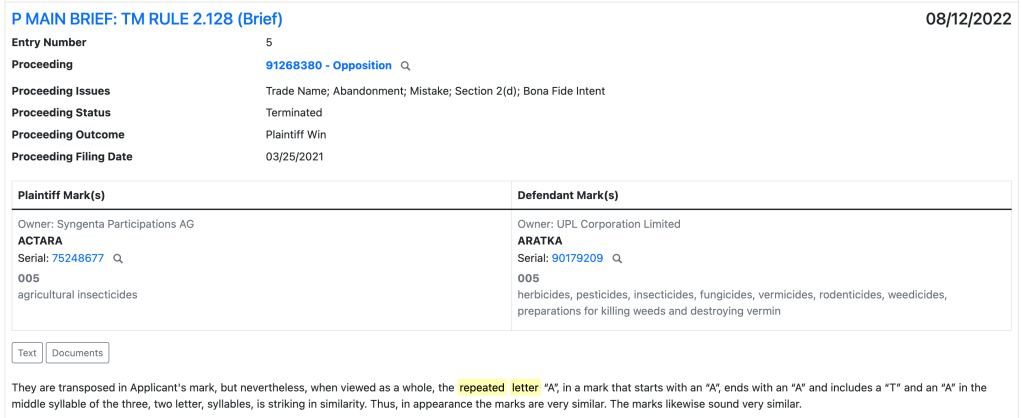
For example, if you’re searching for arguments about a “repeated letter,” you can track down similar arguments in seconds.

Appeal research

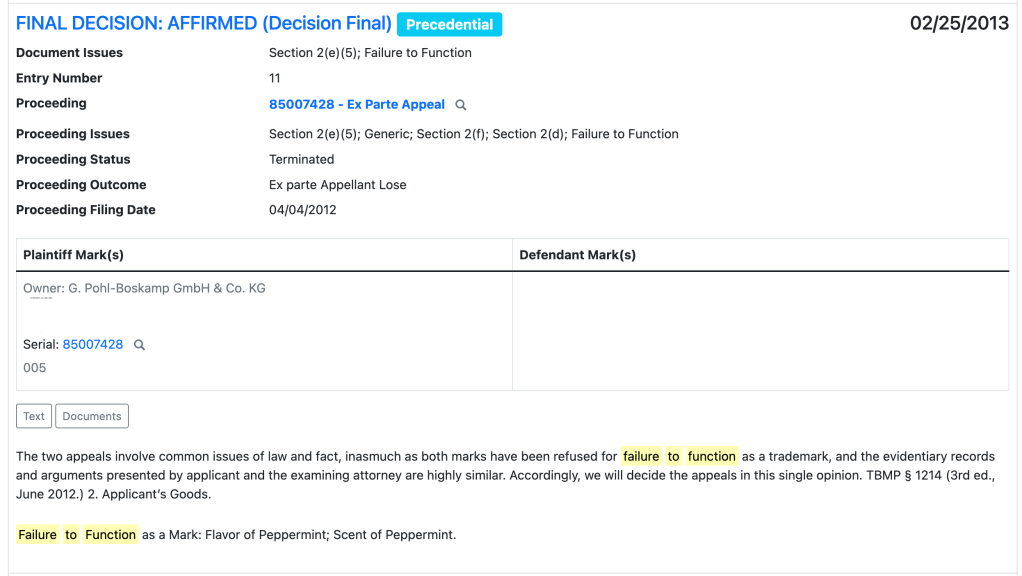
Find briefs that have been effective on your specific issue, or free-text search to find how other lawyers are effectively citing to a specific case or building a particular style of argument. For example, you can search for appeal decisions relating to “failure to function” refusals, and then sort by precedential decisions.


Clearance

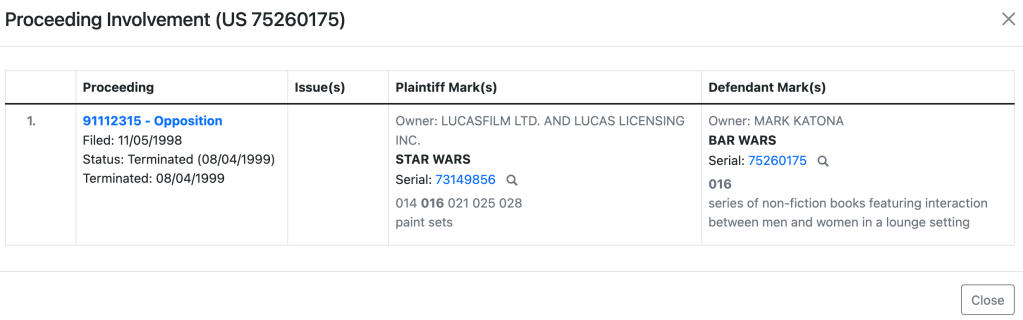
Clearance reports now embed valuable opposition, cancellation, and appeal data. You can now identify aggressive potential opposers without further research. Where applicable, you will see a “Proceedings” line in the Mark field of your manual or automated search results, as below.

Click in to quickly see more details about the proceeding in question via a popup. If you need to dig further, just click on the link to the proceeding number to go to the full details page.

Get researching!

Try it today! We’d love to hear what you think, and when you have been able to make use of the new TTAB research tools to improve your client outcomes. And, of course, make sure to mention this to your litigation-focused colleagues who may not have used TM TKO before.

What Issues Mattered in Trademark Prosecution in 2022?

As a trademark practitioner, you know that not all Office Actions are created equal. If your Office Action just raises an issue with a specimen or a disclaimer request, there may be some back-and-forth with your examining attorney, but the issue will almost certainly get resolved sooner or later. You can get a feel for how likely an issue is to be resolved prior to publication with our Office Action analysis tool and the Examiner analytics it provides.

If, however, you run into a functionality refusal or a likelihood of confusion refusal, you’re likely looking at at least one round of substantive back-and-forth. Applications running into these sorts of refusals move forward to publication at a much lower rate, as we’ve detailed in some prior blog posts.

What sort of refusals, then, did the USPTO tend to issue in 2022? The big ones were:

Substantive Refusals
Likelihood of Confusion23%
Descriptiveness18%
Non-Substantive Refusals
Specimen30%
Classification25%
Disclaimer22%
Mark description14%
Domicile12%
All numbers are a percentage of times an issue was raised in any Office Action in 2022. Many Office Actions contain multiple issues, so these percentages will not add up to 100%.

Foreign registration-related suspensions and applicant entity clarification requests were present in around 4% of Office Actions each. No other issue exceeded 2% frequency.

A few interesting points arise from this data, particularly the large numbers of non-substantive refusals.

The Office Should Change the Process for Assigning Mark Descriptions. Mark description issues are far more common than I expected. It might be more efficient for the Office to simply assign mark descriptions and allow applicants to object, similar to the process for design codes. That process is highly effective, and applicants rarely push back on the Office’s preferred design coding (or, indeed, the description of the mark phrasing). The change of process would permit some otherwise perfectly acceptable applications from either going abandoned for lack of a response, and speed examination time for almost all of the rest.

Classification Issues Aren’t Going Away. The heavy incentives towards TEAS Plus filing are not enough to eliminate identification woes. While the Office’s ever-widening price gap between TEAS and TEAS Plus is an attempt to mitigate this issue, it can’t solve the whole problem — indeed, it will never solve the issue for any Madrid-based applications. Only further efforts to create a worldwide equivalent of the ID Manual would not only help speed up prosecution in the US, but could address the maddening inconsistencies between what constitutes an acceptable definition goods in various countries. If WIPO could incentivize (e.g. through filing fees) use of such “universally accepted” language, it would be a big improvement for the international trademark system.

Disclaimer Practice is a Drag. Disclaimer requests are really, really common, popping up in over a fifth of Office Actions. Disclaimer practice in the US is riven with inconsistencies; the same term showing up in a short mark will get a disclaimer request; if the mark has a pun in it or if the term is used in a tagline that’s barely any longer, it’ll avoid a disclaimer request. It’s all very silly.

There has to be a better way. A simple, hard-and-fast rule would remove much of this back-and-forth. For example, the Office could adopt a rule that a term that is used in active registrations more than X times (3? 5?) by different owners in a single class is presumptively not likely to cause confusion with another mark, unless there is other evidence of mark similarity like other terms in the mark, visual presentation, etc. That would have two big benefits. First, it would dramatically simplify the confusion analysis. (As a side effect, it would stop the Office from issuing the annoying refusals where 6 companies own registrations for TERMX + SECOND TERM, someone slips through a registration for TERMX alone for narrow goods, and then every subsequent applicant for TERMX + SECOND TERM style marks gets a 2(d) refusal that they have to fight about.) Second, it would obviate the need for disclaimer practice. Just count!

As with mark description issues, some otherwise perfectly fine applications are either going abandoned over disclaimer requests, or have to deal with extra attorney fees to reply (and increased total prosecution time). Neither are a good outcome, and the Office should consider a wholesale revamp of the disclaimer practice to fix it.

Conclusion. Hopefully, we’ve not only given you some insight on the types of issues applicants are running into most often, but also provided some interesting ideas about how the Office could revamp its existing processes to better avoid unnecessary prosecution problems.

Calendar Integration for Deadline Tracking

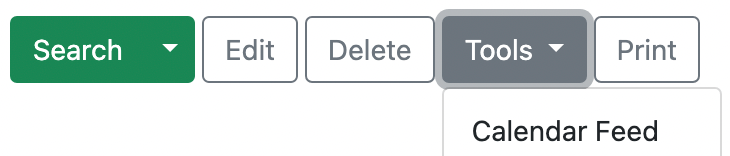
You can now integrate TM TKO’s new Deadlines feature with your preferred calendar. Go to a Portfolio that includes Deadline tracking, and go to the Deadlines tab. Then, in the upper-right corner, select Tools -> Calendar Feed.

On the next page, click “Start Publication.” You will get a secret address URL to your Calendar in the standard iCal format.

Calendar applications generally include the capability to subscribe to a calendar published in the iCal format with a secret address URL. Documentation for adding this iCal link to several common calendars follows:

We hope you find this calendar integration a useful addition, and helpful for keeping atop your trademark prosecution to-do list!

New! Trademark Deadline Tracking

TM TKO is excited to announce a major expansion of the functionality of its Portfolios feature. Now, in addition to built-in conflict checking and automated watch setup, all Portfolios have a “Deadline” tab. It tracks and automatically generates deadlines for more than 4,000 prosecution events, and automatically shows the next upcoming prosecution deadlines for filings in the Portfolio in any of the jurisdictions where TM TKO offers coverage: US, Canada, Mexico, Australia, New Zealand, European Union IPO, France, Germany, Spain, the UK, and WIPO. Individual trademark records now also have a detailed history of past and future deadlines.

Setting up a Portfolio takes under a minute – just go to the Portfolio page. For instructions, go to the Portfolio help page or see our more detailed blog post.

Never forget a deadline with automatic updates

Attorney Portfolios that include deadline watching – a simple checkbox on your Portfolio setup page – will include automatic weekly update emails. While you sip your Monday morning coffee, go through short, actionable lists:

– deadlines due within the next period;
– deadline periods that opened in the last period; and
– deadlines that closed in the last period.

Or, hop on the TM TKO platform and view the Deadline tab for that Portfolio to get a broader horizon of upcoming deadlines. It’s simpler than ever to keep track of what you need to be doing to stay on top of your practice.

What’s the cost?

Deadline tracking via Portfolios is included in your TM TKO subscription. There is no change in price, just an increase in functionality. 

Bulk Knockout Search – Now Included at No Extra Charge

Bulk Knockout Search is now included for all subscribers with no additional charge. Bulk search lets you quickly input details for a large number of searches at once, and gives you a convenient summary report “on top” of your individual search reports. It’s a super-efficient way to run and review large numbers of reports for a brainstorming client, to effectively manage a large, catalog-type clearance project, and more.

What’s coming next?

TM TKO has many projects underway already. In 2023, TM TKO will expand the new deadline-related features, incorporate TTAB data, expand our international coverage for both search and deadline purposes, continue to advance search, and so much more. We’re looking forward to 2023 being our best year yet.

Setting up Portfolios for International Deadline Tracking

This blog post expands on TM TKO’s new Deadline tracking feature, and provides more detail about how to set up a Portfolio to get the most coverage.

Most TM TKO subscribers use Portfolios as a convenient way to set up watches for a large number of marks at one time. In the US, this is usually done using the correspondent e-mail address; in other countries, attorney or firm name are most common.

When it comes to watching, a streamlined Portfolio is the best. You want to pick a country, usually your “home” jurisdiction, as the base for all your watches — there is no point in having 6 watches for the mark XYZ, all for the same services, just because it’s registered in 6 jurisdictions.

But, Portfolios are very flexible — any search strategy can define a Portfolio. Firms that do dispute-related work for clients that have in-house counsel will often set up a Portfolio for that client based on the Owner name field.

When it comes to deadline tracking, though, you want a comprehensive Portfolio. If your work is all in one jurisdiction, you are already done — the same Portfolio for watch will work perfectly. The “Watch deadlines” option will already be turned on for you. If you’re doing international work as well, you will want a couple of additional steps. The best bet is to set up a supplementary Portfolio to just do deadline tracking.

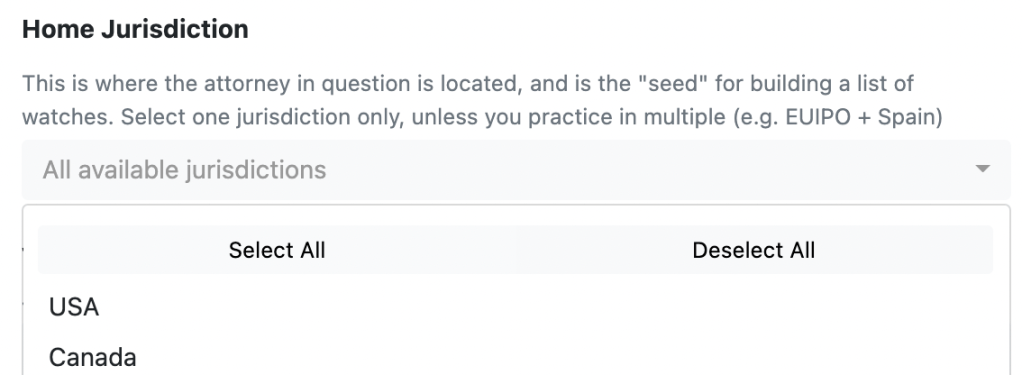
First, at the top of the setup page, change the Home Jurisdiction to everything — hit “Select All.”

Second, at the bottom of the setup page, make sure to turn off “Watch Similarity” on this Portfolio, to make sure you don’t get a bunch of duplicate watches.

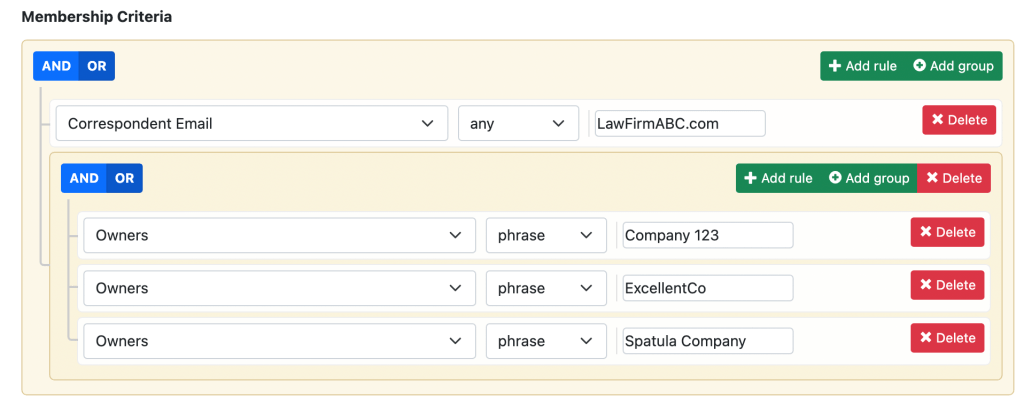
Finally, you’ll want to use two approaches to setting the membership criteria: (a) set up your usual identifier (email/firm/name) in one field, connected by an OR to (b) a group (via “add group”) where you set up a set of Owner fields with “phrase” matching, also connected by an OR. So you’ll end up with something like this:

As you need to add extra companies for international coverage, just Edit this Portfolio — “Add Rule” in the company group and add the new name.

If you have any questions or need a hand in setting up Portfolios to maximize your Deadline tracking, don’t hesitate to email us or set up a time for a web meeting from inside the platform — we are always happy to help.

Slow Examination & Petitions to Make Special

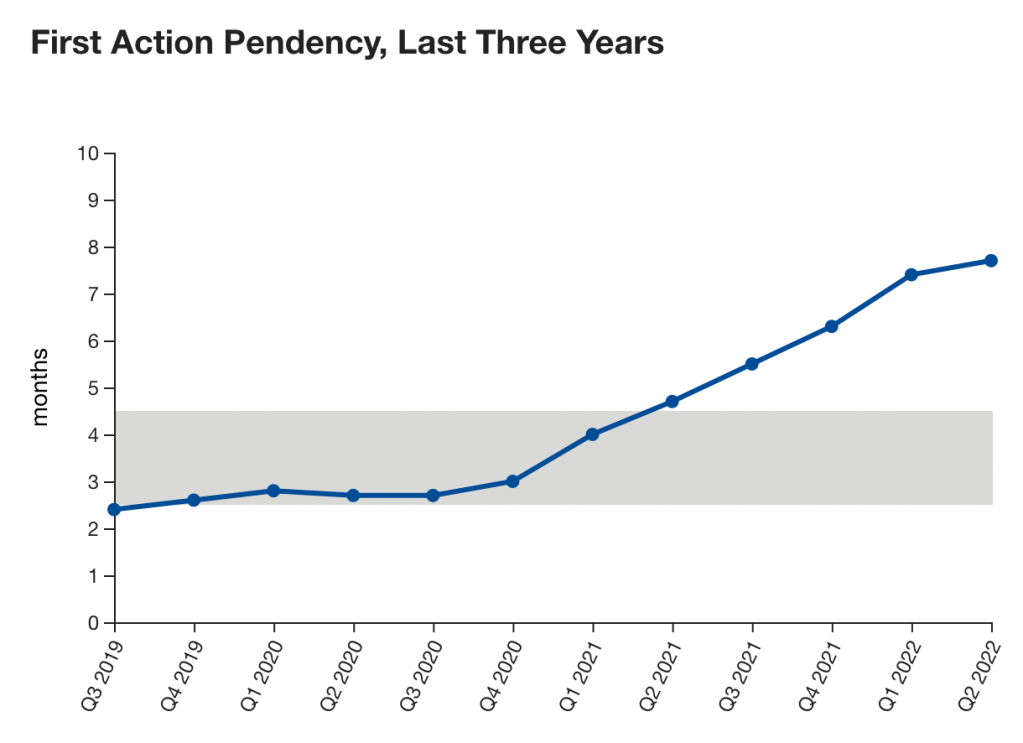
The USPTO is currently examining new applications at a much slower clip than their historical norm. Rather than expected initial examination within about 3 months of filing, now, by the Office’s own data, it’s at least 7.5 months. That time is probably overly optimistic, since a new application filed today faces an extra 7.5 months of backlog between it and first examination.

Source: https://www.uspto.gov/dashboard/trademarks/

The Paris Convention provides US applicants 6 months in which to file internationally and claim the benefit of their US application, and this ends up being a de facto filing deadline for many applications filed via the Madrid Protocol. Applications filed through the Madrid Protocol provide substantial benefits to applicants, including comparatively cheap filings and convenient renewals and assignments. However, registrations issued via Madrid are dependent on the registrant’s home country application(s) or registration(s) for 5 years.

As we know, clients do not always select marks with completely clear paths towards registration. Since it’s now taking way longer for applications to receive an initial examination than the 6 months provided by the Paris Convention, what’s an applicant to do? File via Madrid with some uncertainty? File direct in-country applications?

The USPTO does have a mechanism to accelerate examination. A Petition to Make Special costs $250; if granted, it moves an application to the front of the line for examination. Per TMEP § 1710 – 1711:

A petition to make “special” must be accompanied by: (1) the fee required by 37 C.F.R. §2.6; (2) an explanation of why special action is requested; and (3) a statement of facts that shows that special action is justified. The statement of facts should be supported by an affidavit or declaration under 37 C.F.R. §2.20.

Invoking supervisory authority under 37 C.F.R. §2.146 to make an application “special” is an extraordinary remedy that is granted only when very special circumstances exist, such as a demonstrable possibility of the loss of substantial rights. A petition to make “special” is denied when the circumstances would apply equally to a large number of other applicants.

The most common reasons for granting petitions to make “special” are the existence of actual or threatened infringement, pending litigation, or the need for a registration as a basis for securing a foreign registration.

The Office provides minimal guidance on when Petitions will be refused.

The fact that the applicant is about to embark on an advertising campaign is not considered a circumstance that justifies advancement of an application out of the normal order of examination, because this situation applies to a substantial number of applicants.

The “need for a registration as a basis for securing a foreign registration” is close, but it’s not quite what we need here. You technically don’t need a US registration to survive the Madrid pendency period, provided that you can stall out an application at the USPTO long enough. What we want the quick US examination for is really certainty.

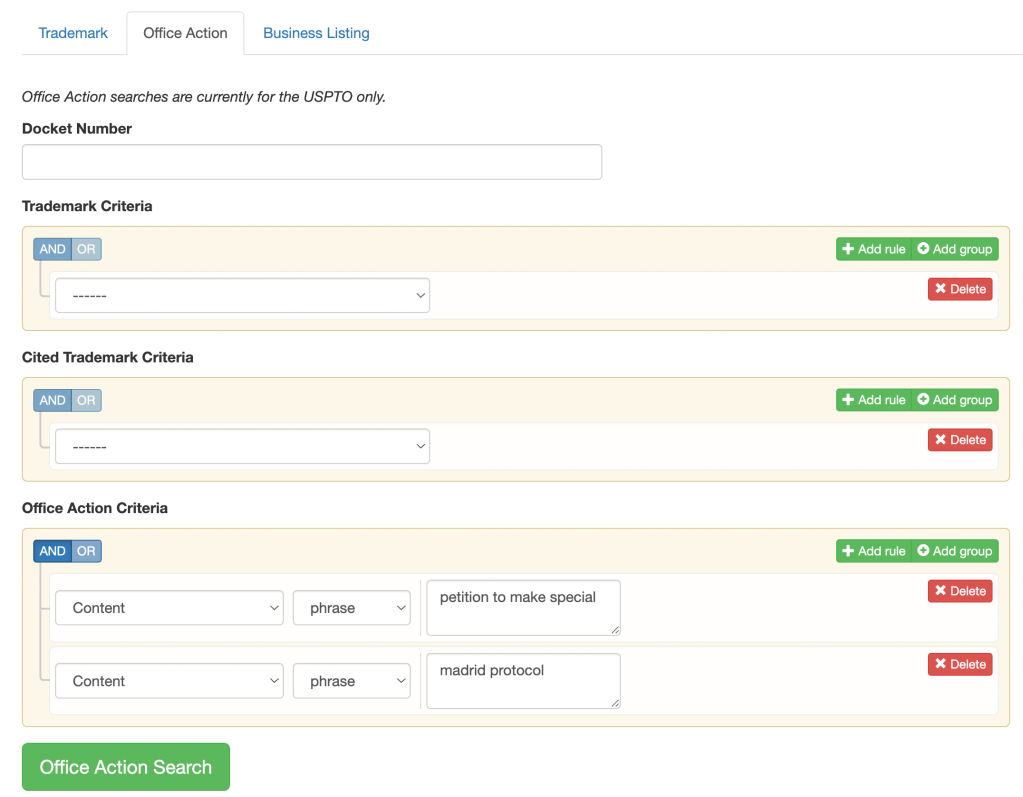
Seeing how these requests turn out is a perfect job for TM TKO’s prosecution research tools. Go to Search and then Office Action, and we can look for documents that have both the phrases “Petition to Make Special” and “Madrid Protocol.”

This finds more than 75 documents. Some of these relate to Petition attachments that use relevant keywords, so we then tweak the search to screen those out, and end up with about 65.

Petition Decision YearGranted*Denied
201530
201670
201760
201870
201920
202080
202185
2022
*If the Petition was specifically granted or was just examined really quickly thereafter, I counted it as “granted.”

What’s up with the refusals in 2021? These start in July 2021, and the refusals all have some variation of the following:

Petitioner states within the application the need to secure a foreign registration for the above mark. Petitioner omitted the required supporting evidence, e.g., proof showing that a foreign intellectual property office requires a U.S. trademark registration in order to submit a trademark application in that country (…) from the petition.

This is fairly wild. None of the prior petitions from 2015 – 2021 had any evidence whatsoever, and some of these were filed by the exact same attorney using the same request text that had been granted before, and granted dozens of times. It’s dumb that a Petitioner would need to provide — what, a copy of an excerpt of the Madrid Protocol text?? — to the Office for the Office to recognize that the Protocol requires a home country app/reg for the dependency, since the USPTO’s own rules enforce that exact same requirement. Nevertheless, that’s apparently exactly what applicants out to do going forward.

TM TKO Announces Clearance Search Improvements

TM TKO is proud to announce a sweeping new round of innovations in its automated, in-depth clearance tool. These improvements focus on goods-and-services comparisons.

First, we have added an entirely new way of comparing key concepts between different types of products and services. Driven by leading-edge artificial intelligence, these comparisons better cut through the noise to highlight risks across classes.

Second, there is a dramatically improved classifier. In the enhanced goods and services selector tool, you will see class information and whether the description is in the USPTO’s Trademark ID Manual, helping you select the best and most accurate set of descriptions for your search.

You will see benefits from the new classifier in substantive search outcomes, too. Newly filed applications with incorrect classifications will take into account both the applicant-assigned class and the “correct” class from the classifier, upping scoring accuracy and search quality on even accidentally or intentionally misfiled applications. You will see similar benefits in the scoring of older registrations where the “correct” classification for the relevant goods or services has changed since the registration date.

How will these changes impact the appearance of your report? The most conceptually-related goods or services will score substantially higher than before in the table of most reports. You will also see these results visualized further to the right in your results scatterplot.

Finally, we are retiring the “retail” and “software” tabs in the goods-and-services selector for the Knockout tool. Now, a search for a mark for services like “retail shoe store services” will do an excellent job highlighting related products and services without the need for either the old retail tab or putting in multiple descriptions of goods or services. We have already updated existing searches and watches that used those tabs to appropriately take advantage of the new methodology; you won’t need to do anything.

We’re thrilled to have these improvements integrated into our system, and hope you find them as exciting as we do!

Re-Examination and Expungement under the TMA: a Very Early Look

The Trademark Modernization Act created two new ex parte procedures – re-examination and expungement. To oversimplify slightly: the former is intended to correct botched or incomplete examination; the latter is an ex parte version of a non-use cancellation action.

The Office Actions generated by these new procedures are unusual in that they have short turnaround times — 3 month response deadlines, extendible once for 1 month. Unsurprisingly, given the current delays the USPTO is seeing across the trademark landscape, progress is slow.

# Filed# Deficiencies# Office Actions# of Registrant Responses
Dec. 2021
Re-examination
Expungement

3
5

0
0

3*
1

0
0
Jan. 2022
Re-examination
Expungement

7
15**

2 (2 responses)***
1

1
1

?
1****
Feb. 2022
Re-examination
Expungement

10
6

0
0

0
0

0
0
Numbers are as of March 2, 2022; there may be some lag between submission and the USPTO processing the various files.

* All three were basically the same, for variations of the same mark.

** One of the fifteen was withdrawn.

*** One was not instituted at all, without even generating a deficiencies notice. It was submitted by an unrepresented petitioner. Frankly, I’m not sure it was substantially different from others that did get a chance to amend via the deficiency process. The petitioner got a bit of a raw deal.

**** Our one example was a response filed by an unrepresented applicant; the response does not attach an example of use

If you need to file a re-examination or expungement request, the relevant forms are available here. It looks like registrants will use a standard Post-Registration Office Action Response form, but we’ll see if those end up being the same file type or not — none have been filed yet.

Finally, if you need to do research about how others are filing or responding to re-examination or expungement requests, you can do that on TM TKO. In an Office Action search, you can select Document Types that are relevant to Re-Examination or Expungement proceedings: Petition for Expungement/ReExam form, Response to Petition Inquiry-Expunge/ReExam, and 30-day Inquiry Letter to Petitioner. The Registrant’s Office Action responses will also be searchable, whether as a unique file type or batched with normal Post-Registration Office Action Responses remains to be determined.

Updated Interface Features and Bulk Search


TM TKO has made a number of updates and improvements to to our user interface over recents weeks, and we thought a summary blog post was warranted to summarize all the changes!

Tracking improvements

Across all searches, we’ve added a “Docket Number” field. You can also find this in your History window, making it easy to keep track of — and get back to — prior projects.

Search tagging and commenting

In all searches, we have made a number of improvements to make it easier to tag and comment on results. The first column of your results now has more going on than it used to. The first row has a number and a pair of arrows; these let you move around in the report and control its functions. The second row has expanded tagging functionality and a new notes feature.

The number in the upper-left is now an active link. Click on it, and we’ll bounce you up to the scatterplot to see where this application or registration record is located.

The paired arrows in the upper right will compress the contents of that row to a single line, or expand it again. It’s useful for shortening up lengthy descriptions of goods and services.

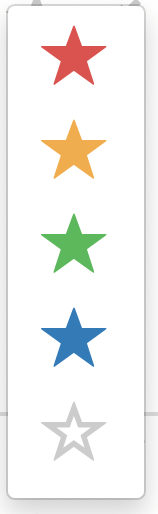
The tagging star is not new, but some of its functionality is. When you click on the star, it won’t immediately turn blue like it used to. Instead, you’ll get a popup with several color options: red, yellow, green, blue, and clear. This will let you prioritize and re-sort results how you want them, both inside the platform and in exports. (More on the export side shortly.) All of your old searches with blue stars will still appear blue, but you can edit those to use the new colors.

After you pick a star, you can double-click to apply that same star color to any other rows. Pick a new color from the color selector, and double-clicking will apply that new color.

The little pencil-writing-on-paper icon in the lower right allows you to add and edit notes on a per-record basis. Click on one, and you’ll get an interstitial pop-up to add your comments: comments about the risk analysis, a link to the mark in use, or etc. In the platform, you can read the comment by clicking on the icon — you’ll see a darker icon for any rows that have user comments.

Where the comments show up in exports varies a bit. For Word and PDF exports, they show up in a row immediately below the commented-upon record. Some comments can be pretty long, and this makes sure your insights won’t be squashed into a tiny little column. For CSV exports, they’ll be the furthest-right column, but on the same row.

Search report spacing and review

The small “paired arrows” in the bottom right show up in several places in the interface. They do the same thing: give you a “compressed” view of results. If you click on it on a single line, it’ll shorten that up to just the core details. You might use it to, say, skim over a 44(e) registration with a list of goods that goes on and on and on and on. Here’s what a shortened row looks like:

If you click the two-arrow icon on the top of a search or a section of a search, it’ll single-line all records. It’s just like the per-row expander, but applied to the whole section of the report. If you click the four-arrow expander icon, for either the whole report or just a section, the rows will expand to the full width of your window with no whitespace buffer.

Search export

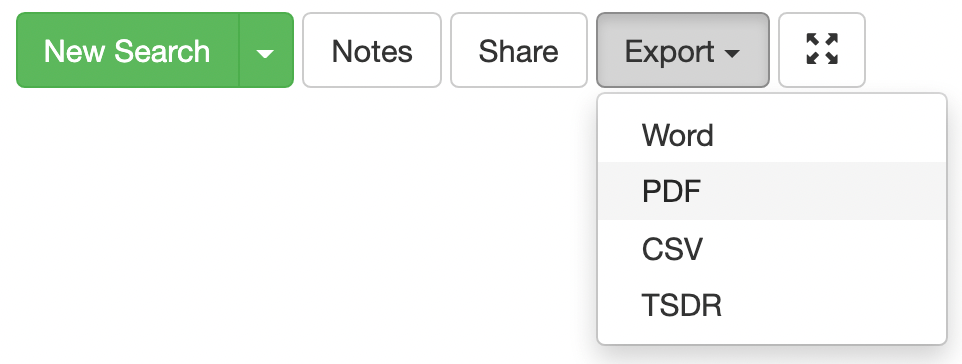
The export buttons have moved from specific sections to a unified export button at the top right of the page, as shown below.

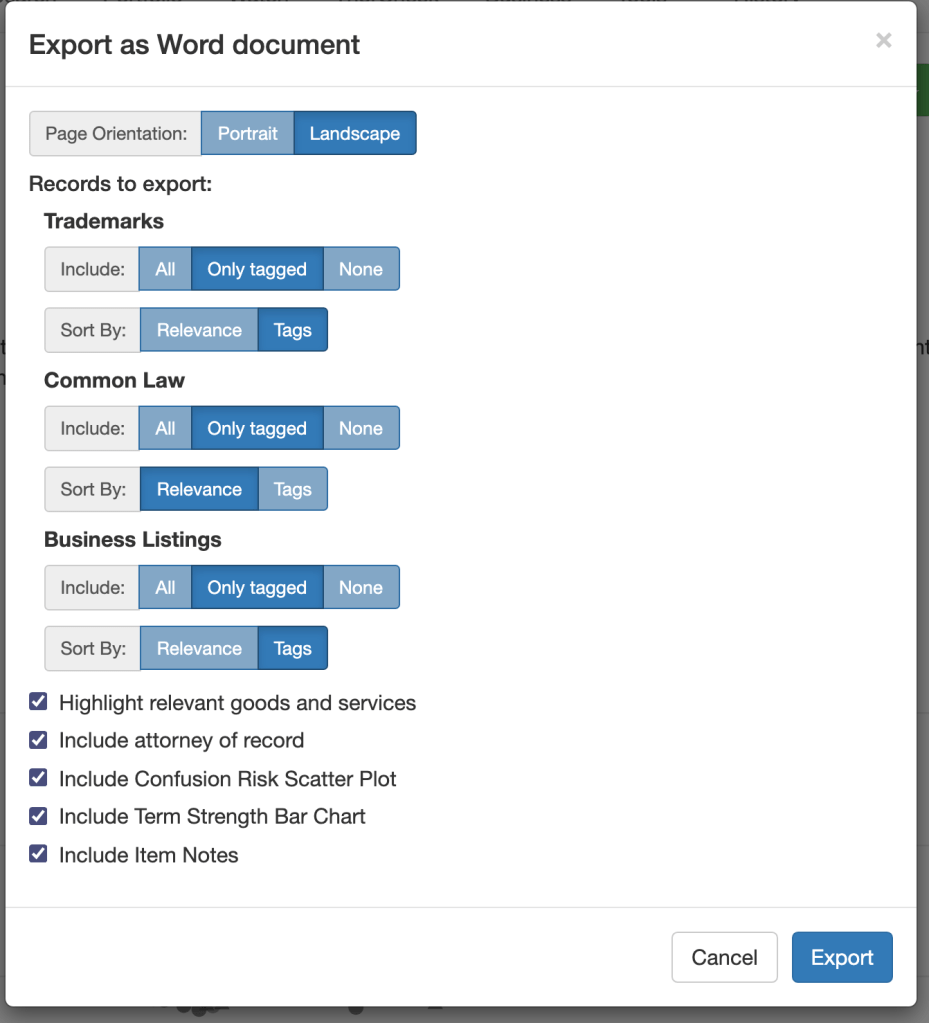
When you click on an export type, you’ll get a much more detailed set of options than before. You now have more optionality about both what results to include by section (all, only tagged, or none) and about the order they will appear (sorting by relevance or tags). If you sort by tags, you’ll get results in order, with red first then yellow, green, blue, and clear (untagged). This should allow you to get your charts ordered exactly how you want them with less effort.

At the bottom, you’ll see some extra checkboxes — you can choose whether to include static images of the scatterplot and bar graphs (previously available in PDF and now available in Word, too), and whether to include item-specific notes.

Bulk Search

Users with heavy clearance needs have requested a way to enter bulk searches. For example, clothing brands may need to clear hundreds of names for a new seasons’ catalog, or pharma brands may need to get a long list of candidate names to submit for regulatory approval. We have just added a feature to facilitate these clearances.

The new Bulk Order page under Knockout is where you can take advantage of this new convenience. It’s simple to order multiple searches for different marks using the same goods, whether word marks or designs, and you can even input names via spreadsheet. Bulk searches are no less thorough than a normal search, and you can go into each search report individually. To facilitate quick review, bulk orders also have a convenient preview page that summarizes all the results. It provides you a quick risk assessment (using the red/yellow/green stars; these are user-editable so you can customize the assessment) and a short preview of the top handful of results. It’s a huge time saver! To reflect the additional computational impact of turning around large numbers of results quickly, bulk orders have a $5 fee per marked searched.

Thanks!

Your feedback and suggestions are really important to TM TKO — they help inform how and when we make updates to our services. We hope that you will enjoy these upgrades, and keep the suggestions coming!

Trends in 2(c) refusals

For today’s blog post, we’ll take a look at 2(c) refusals. Section 2(c) of the Lanham Act provides that registration should be barred where a mark:

Consists of or comprises a name, portrait, or signature identifying a particular living individual except by his written consent, or the name, signature, or portrait of a deceased President of the United States during the life of his widow, if any, except by the written consent of the widow.

Looking at just US-based applicants, 2(c) refusals apply in about 2% of outgoing Office Actions. Still, given the large numbers of applications in 2021, that’s almost 4,000 2(c) refusals to date. Roughly 100 of those are for Presidentially-related marks, in a roughly even mix of Biden-Harris-related and Trump-related filings, and a smattering of Obama-related ones still percolating around from the especially stubborn. As a group, these have to be some of the lowest-quality applications that the USPTO has to slog through. Most of these arguably don’t function as marks anyway and/or would get refused on “failure to function” grounds or under 2(a) anyway, even if 2(c) was not a part of the statute.

That still leaves us with quite a number of 2(c) refusals. We reviewed all of them, and roughly 70% are “traditional” sorts of 2(c) refusals — the actual name of or a mark incorporating the actual name of a person (BROCK LESNAR or GLORIA SERVICES or GILLIE CHESTER’S NASHVILLE HOT!), or their name-like pseudonym or nickname (ZØ MARIE or STEWIE). A few are a bit further afield from being name-like, like PRINCE OF BLUE or ALKALINE VEGGIE MOMMIE. (Occasionally, the Examiners have to be careful about their phrasing to avoid theological discussions about whether 2(c) should apply to IAMGAWD, a DJ.) Refusals based on the picture element alone are pretty uncommon, but do happen occasionally, especially for more lifelike portraits where a face is more clearly identifiable, as in this application for LATINX POP LAB, where the Examiner did a Google search for the applicant, noted the likeness, and asked for a consent statement.

Drawing: 90153883

Plenty of marks generate 2(c) inquiries where the Examiner just can’t tell, like TALDE, or that sound name-like but the applicant says do not identify a specific living individual, like LINGLEE.

Class 41 entertainment-related content (live events, etc.) and associated goods like musical recordings, etc. are far more represented in 2(c) refusals than the general application pool. Over one quarter of 2(c) refusals are in Class 41.

If you ever need to research 2(c) refusals or effective responses, you can use TM TKO’s Office Action research to dive deep into the issue, and find effective responses on similar facts, or that have convinced your Examiner, or both!